Slideshow
From Amahi Wiki
Slideshow
Slideshow lets anyone with a browser automatically see the pictures in your HDA picture directory as a slideshow. Simply put picture folders in the HDA pictures folder:
\\hda\pictures
Viewing Pictures
There are two ways to do this at the moment:
- invoke the Slideshow app directly
- use CoolIris (a browser plugin from http://cooliris.com) for a dynamic view of from your pictures on a 3-D wall

Exporting Pictures from Picasa
One feature of Slideshow is that it seamlessly supports Google's Picasa picture folders, including captions !
This is how to create Slideshows from Picasa folders:
- In a Picasa picture folder, edit your picture originals and captions as you would normally do
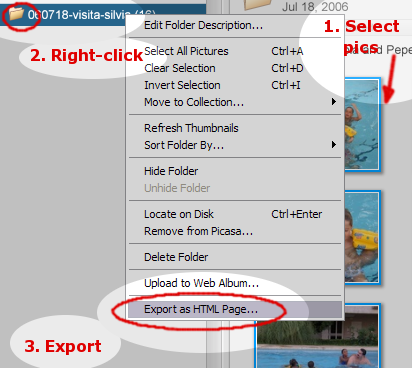
- Select all the pictures in a folder that you want to export (note: it's common to forget selecting pictures.)
- Right-click on the folder you want to export and click on "Export as HTML page ..."

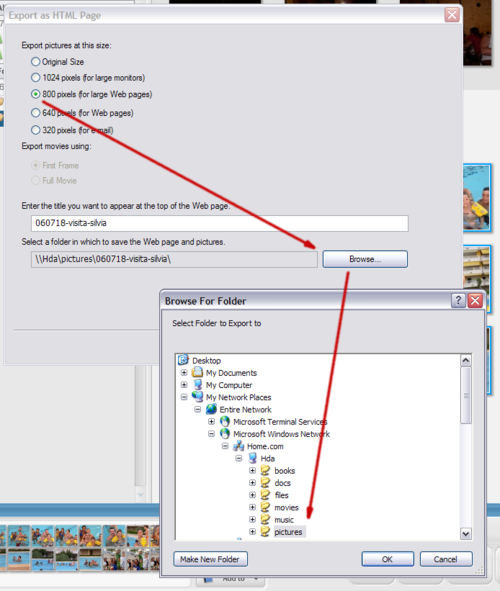
- In the "Export as HTML Page" Window, select your preferred size (800x600 is good enough for typical monitors).
- Click on "Browse..." and navigate to the \\hda\pictures network locationm then click on "Next >"

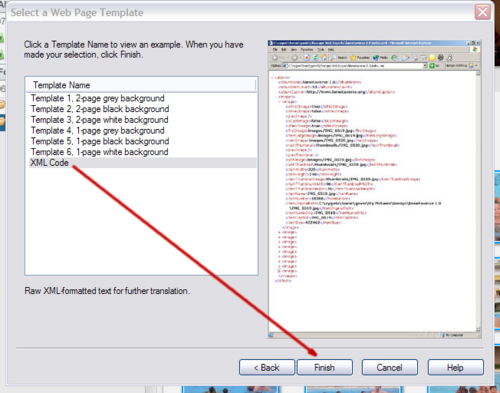
- In the "Select a Web Page Template" window, select "XML Code" and click on "Finish".